phone iconSpeak with our expert +1 512 877 8310

Trusted by millions of learners worldwide

Learn more about the course

Get details on syllabus, projects, tools, and more

Name
Email
Mobile Number

By submitting this form, you consent to our Terms of Use & Privacy Policy and consent to be contacted via email, phone (including by AI-generated/pre-recorded voice calls), SMS, or WhatsApp.

Data Analytics Essentials

Data Analytics Essentials

Master data analytics applications and secure a future-ready career

Application closes 15th May 2026

overview icon

Program Outcomes

Advance your career in Data Analytics

Become a data analytics expert

  • List icon

    Perform descriptive and exploratory data analysis using Excel, SQL, Python, and visualization tools.

  • List icon

    Query, transform, and analyze data with SQL for insights; use Python for prep, EDA, and analysis.

  • List icon

    Understand the analytics lifecycle and apply AI-assisted workflows to speed exploration and insights.

  • List icon

    Validate AI-generated code and insights using analytical judgment and sanity checks.

  • List icon

    Analyze text data with NLP and GenAI, translating findings into clear business narratives.

  • List icon

    Apply embeddings, vector databases, and RAG concepts at an analyst level and build and deploy generative AI workflows.

Earn a Professional Certificate in Data Analytics from Texas McCombs

  • #1 (U.S., Big Data Management) in MS Business Analytics

    Eduniversal (2025)

  • #6 Analytics

    U.S. News & World Report (2025)

  • #6 Business Programs

    U.S. News & World Report (2025)

  • #7 in MS - Business Analytics

    QS World University Rankings (2022)

  • #7 in MS Business Analytics

    The Financial Engineer Times (2025)

  • #3 in Information Systems Graduate Programs

    U.S. News & World Report (April 2025)

  • #7 Public University in the U.S.

    U.S. News & World Report, 2026

  • #6 in Executive Education - Custom Programs

    Financial Times, 2022

Key program highlights

Why choose the data analytics essentials program?

  • List icon

    Learn from world’s top university

    Earn a certificate from a world-renowned university, taught by the esteemed faculty

  • List icon

    Industry-ready curriculum

    Learn the foundations of Python, GenAI, Data Visualization and more from top faculty. Gain valuable insights and apply your skills.

  • List icon

    Hands-on projects

    Work on projects alongside established data scientists and fellow learners worldwide

  • List icon

    Get expert mentorship

    Interact with mentors specialised in Data Analytics and get guidance to complete and showcase your projects

Skills you will learn

Data Analysis with Excel

Descriptive Statistics

Python Programming

Data Transformation with Pandas and Numpy

Exploratory Data Analysis (EDA)

Data Visualization with Seaborn and Tableau

Interactive Dashboard Creation

PowerBI

Generative AI and ChatGPT Applications

Storytelling with Data

SQL Querying and Data Management

Data Analysis with Excel

Descriptive Statistics

Python Programming

Data Transformation with Pandas and Numpy

Exploratory Data Analysis (EDA)

Data Visualization with Seaborn and Tableau

Interactive Dashboard Creation

PowerBI

Generative AI and ChatGPT Applications

Storytelling with Data

SQL Querying and Data Management

view more

Secure top data analytics jobs

  • 11.5 million

    new jobs by 2026

  • Up to $110K

    avg annual salary

  • $105 million

    mkt value by 2027

  • 92%

    orgs use data

Careers in Data Analytics

Here are the ideal job roles in Data Analytics:

  • Data Analyst

  • Product Analyst

  • Business Analyst

  • GenAI and Analytics Engineer

  • BI Analyst

  • Data Architect

  • Data Engineer

  • Data Journalist

  • Research Analyst

  • Data Scientist

Our alumni work at top companies

  • Overview
  • Career Transitions
  • Why GL
  • Learning Journey
  • Curriculum
  • Projects
  • Tools
  • Certificate
  • Faculty
  • Mentors
  • Reviews
  • Career support
  • Fees
  • FAQ
optimal icon

This program is ideal for

The Data Analytics Essential certificate program is designed for professionals looking to develop essential data analytics skills. It equips participants with the ability to interpret data, generate insights, and apply data-driven solutions in their careers or businesses.

  • Early-Career Professionals

    With 0-3 years of experience, looking to develop job-ready skills in Data Analytics and Business Intelligence domains.

  • Professionals

    Looking to build foundational analytics skills or enhance their capabilities with AI-assisted workflows.

Experience a unique learning journey

Our pedagogy is designed to ensure career growth and transformation

  • banner-image

    Learn with self-paced videos

    Learn critical concepts from video lectures by faculty and data analytics experts

  • banner-image

    Engage with your mentors

    Clarify your doubts and gain practical skills during the weekend mentorship sessions

  • banner-image

    Work on hands-on projects

    Work on industry-guided projects and apply the concepts & tools to solve business problems

  • banner-image

    Get personalized assistance

    Our dedicated program managers will support you whenever you need

Get an exclusive free preview of the course

Explore faculty videos and mentorship sessions. Get insights into relevant case-studies and projects.

preview banner

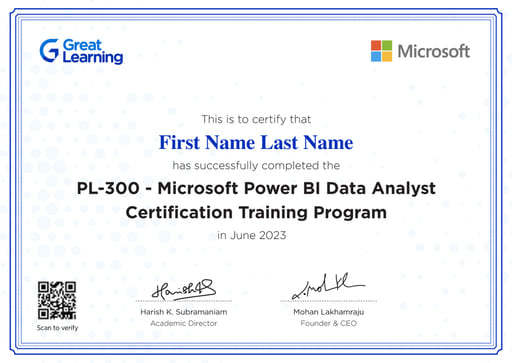
Ace Power BI Certification

banner

Ace PL-300 certification*

Prepare for PL-300 Certification Exam with:

  • Live Virtual Classes with Microsoft Certified Instructors

  • Hands-on Learning and Academic Support

  • Exam Preparation Guide

  • Hands-on Projects

*Delivered by Great Learning in collaboration with Microsoft

Curriculum

Designed by the McCombs School of Business at The University of Texas at Austin, and industry experts, the curriculum for the Data Analytics Essentials Program is taught by renowned professors and industry practitioners. It covers the foundational concepts, key skills, and essential tools required to excel as a data analyst.

Pre-work

Build a strong foundation before starting the program by learning essential concepts in programming, statistics, and Generative AI.

Introduction to Excel

Master Excel basics by learning to automate calculations, organize raw data into structured tables, and use logical IF statements. Understand how to transform large datasets into structured, searchable information that supports analysis.

Descriptive Statistics

Learn how to identify patterns and trends in data using fundamental statistical concepts such as averages, distributions, and summary metrics. Develop the ability to quickly interpret datasets and understand the overall story behind the numbers.

Introduction to Generative AI

Get an overview of Large Language Models (LLMs), their capabilities and limitations, and their role in modern data analytics workflows. You will also create or update your GitHub account to begin building a portfolio for your analytics projects.

Course 1: Data Analytics and Generative AI Foundations

In this course, you will be introduced to Industry 4.0, key roles and responsibilities in the data industry, and real-world use cases that demonstrate how business problems are solved using data.

Analytics Life Cycle

Understand the step-by-step journey of how data is transformed into business decisions—from data collection and storage to analysis and insight generation. Through a real-world case study, you will learn how organizations uncover insights and use data to solve business problems.

LLMs and Prompt Engineering

Explore the fundamentals of Large Language Models (LLMs) and learn how to guide AI outputs through effective prompt engineering. You will also learn how to adjust parameters such as temperature and top-p to control model responses and enable AI to answer questions using your own documents and data sources.

Generating Insights Using Excel

Learn how to analyze datasets in Excel and transform your findings into clear summaries and professional visualizations. By the end of the week, you will be able to create charts and dashboards that highlight key trends and support data-driven business decisions.

Course 2: Data Analytics with SQL

In this course, you will learn how to query databases, transform data, and extract meaningful business insights using SQL.

Querying data with SQL

Learn how to use SQL to communicate with databases and retrieve specific information using filters and conditions. You will also learn how to calculate key metrics such as totals, averages, and counts across large datasets using simple queries.

Advanced Querying to extract business insights

Develop skills to clean and transform data by modifying text, dates, and formats using SQL functions. You will also learn how to combine multiple tables using joins to generate richer and more meaningful business insights.

Enhancing Query Proficiency

Learn to write more advanced SQL queries using window functions to calculate running totals, rankings, and comparisons across rows. You will also learn how to break down complex analytical problems using subqueries for more efficient analysis.

Project Week

Course 3: Data-Driven Insights Using Python

In this course, you will learn how to create analytical datasets by cleaning and transforming data using Python and perform Exploratory Data Analysis (EDA) to uncover patterns and insights.

Introduction to Python Programming

Learn the fundamentals of Python programming, including how to apply logic using conditional statements and loops to automate repetitive tasks. You will also learn to write efficient code using list comprehensions and create reusable components using functions.

Data Transformation Using Pandas

Develop practical skills using Pandas, a powerful Python library for data analysis. You will learn how to load, clean, modify, and merge datasets (DataFrames) to transform raw data into structured, analysis-ready datasets.

Exploratory Data Analysis

Focus on preparing and validating data before analysis. Learn how to identify errors, handle missing values, and detect outliers, enabling you to better understand the quality and reliability of your data.

Statistical Analysis for Decision Making

Shift from basic data observation to informed decision-making using statistics. Learn how to analyze small samples to draw meaningful conclusions about larger populations through statistical estimation and hypothesis testing, strengthening your ability to make data-driven claims.

Project Week

Course: 4 Building Generative AI Workflows

In this course, you will learn how to design, evaluate, and deploy Generative AI workflows for analytics applications using modern tools and frameworks.

Prompt Validation, Optimization, and Evaluation

Learn how to evaluate and improve prompt performance by curating ground-truth examples to measure model outputs objectively. You will implement LLM-as-a-Judge techniques and apply quantitative evaluation metrics such as Accuracy, F1 Score, and Exact Match. You will also learn how to calculate Inter-Annotator Agreement (IAA) to ensure reliable human evaluation benchmarks, and apply programmatic prompt optimization techniques using frameworks such as DSPy to improve model performance beyond manual prompting.

Building Generative AI Workflows and Deployment

Learn how to build end-to-end Generative AI workflows using frameworks such as LangChain to connect multiple LLM calls, external tools (such as SQL and search), and memory. You will also package workflows into functional applications using tools like Streamlit or FastAPI and implement observability techniques to monitor and debug AI pipelines.

Project Week

Self-Paced Course: Claude-Based AI Workflows

This module is designed to build practical capability in applying Generative AI and Agentic AI using the Claude ecosystem in real-world contexts. Learners build the ability to design, execute, and evaluate AI-driven workflows for real-world applications, supported by ~5 hours of structured learning. 

*Disclaimer: Claude API access is not included as part of the program. Learners may explore advanced usage independently.

Design and Execute AI Workflows

  • Model selection and prompt engineering using Claude Chat 
  • Agentic workflow design and orchestration using Claude CoWork 
  • Plan → Approve → Execute → Iterate framework 
  • Designing workflows with reasoning, tools, and multi-step execution 
  • Applying concepts through real-world case studies

Build and Deploy AI Systems at Scale

  • API integration and model usage using Claude Code 
  • Tool integration using the Model Context Protocol 
  • Designing agentic systems with memory, tools, and orchestration 
  • Performance optimization, cost considerations, and system reliability 
  • Responsible AI principles, including alignment approaches such as Constitutional AI

Self-Paced Course: Data Visualization Using Tableau

Learn how to read, explore, and visualize data effectively using Tableau while building the ability to create interactive dashboards and communicate insights through clear, compelling data stories. Strengthen your storytelling with data skills by turning raw datasets into meaningful narratives that support business decisions.

Self-Paced Agentic AI Masterclass

Learn the fundamentals of Agentic AI and understand how intelligent systems can autonomously solve complex business problems. This self-paced masterclass introduces the need for multi-agent systems and walks you through a hands-on demonstration of how multiple AI agents collaborate to execute real-world tasks efficiently.

Hands-on learning & projects

Work on projects and implement your skills with established data experts and fellow learners from around the world

  • 20

    learners group

  • 2-way

    audio-video interaction

  • 3

    Hands-on projects

project icon

Health Insurance

Healthcare Claims Denials & Operations Analytics

Description

Health insurance companies process millions of medical claims each year. A significant portion of operational costs arises from claim denials, delayed processing, and rework. Repeated submissions, documentation issues, and provider-specific patterns can lead to higher operational expenses and longer turnaround times.

Skills you will learn

  • Python Basics
  • Pandas
  • NumPy
  • Data Preprocessing
  • Data Visualization (Seaborn and Matplotlib)
  • Exploratory Data Analysis
project icon

Finance

Credit Card Churn Analytics

Description

Credit card businesses rely heavily on customer retention, where revenue is driven by customers who continue using their cards over time. Even small increases in churn can lead to significant revenue losses due to reduced spending, lower interchange revenue, loss of fee and interest income, and higher customer acquisition costs.

Skills you will learn

  • MySQL Workbench
  • Databases
  • Data Fetching
  • Filtering
  • Aggregations
  • Joins
  • Window Functions
  • Subqueries
  • Order of Execution
project icon

Sales

Sales Intelligence & Pitch Scoring

Description

Sales leadership often lacks visibility into the quality of sales conversations. While outcomes such as closed or lost deals are known, the reasons behind them are often unclear. Identify whether sales representatives effectively communicate key value propositions, where conversations break down, and how product friction points mentioned in calls correlate with lost deals.

Skills you will learn

  • Python
  • Text and NLP Libraries (SpaCy, Sentence Transformers)
  • Vector Stores (Conceptual + Guided Use)

Master in-demand data analytics tools

Learn relevant skills, tools, and concepts

  • tools-icon

    Python

  • tools-icon

    Excel

  • tools-icon

    RDBMS

  • tools-icon

    Business statistics

  • tools-icon

    Tableau

  • tools-icon

    powerBI

  • tools-icon

    SQL

  • tools-icon

    Gemini

  • tools-icon

    OpenAI GPT 5

  • tools-icon

    LangChain

  • tools-icon

    LangSmith

  • tools-icon

    DSPy

  • And More...
  • View More

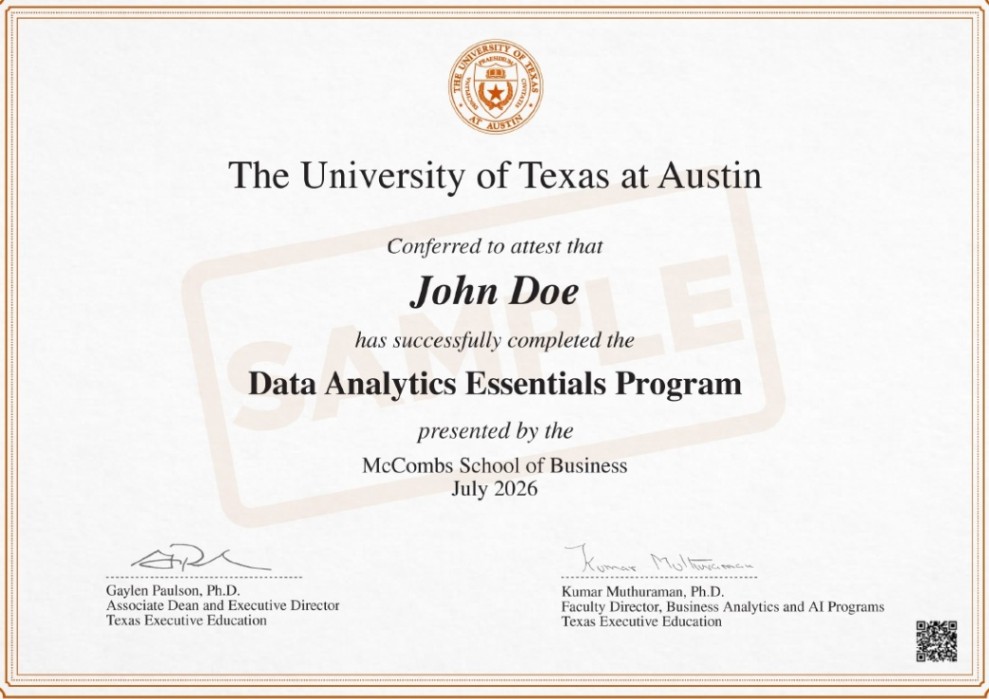
Earn a Professional Certificate in Data Analytics

Get a certificate of completion and 4.5 Continuing Education Units from a leading U.S. university.

certificate image

* Image for illustration only. Certificate subject to change.

Meet your faculty

Learn new data analytics skills each week from top faculty and expert business analysts

  • Dr. Daniel A Mitchell  - Faculty Director

    Dr. Daniel A Mitchell

    Clinical Assistant Professor, McCombs School of Business, The University of Texas at Austin

    Ph.D. in Information, Risk, and Operations Management

    15+ years of experience in financial engineering

    Know More
    Company Logo
  • Dr. Kumar Muthuraman - Faculty Director

    Dr. Kumar Muthuraman

    Faculty Director, McCombs School of Business, The University of Texas at Austin

    Faculty Director, Center for Analytics and Transformative Technologies

    21+ years' experience in AI, ML, Deep Learning, and NLP.

    Know More
    Company Logo
  • Mr. R Vivekanand - Faculty Director

    Mr. R Vivekanand

    Co-Founder and Director

    Expert in data visualization and marketing econometrics with 10+ years

    Qualified Tableau trainer passionate about teaching business analytics

    Know More
    Wilson Consulting Private Limited Logo
  • Dr. Bradford Tuckfield - Faculty Director

    Dr. Bradford Tuckfield

    Co-Founder & Director, Wilson Consulting

    10+ years of expertise in statistics, programming, and machine learning.

    PhD. from the Wharton School, University of Pennsylvania

    Know More
    Company Logo
  • Mr. Faraaz Ahmed Sheriff  - Faculty Director

    Mr. Faraaz Ahmed Sheriff

    Senior Data Scientist

    Expert in advanced analytics and evidence-based decision-making.

    Extensive experience consulting for Fortune 500 companies.

    Know More
    Ontario Ministry of Children, Community and Social Services Logo

Industry mentors from top organizations

Collaborate with mentors in small group sessions to apply skills, overcome challenges, and network globally

  •  Ali Masri   - Mentor

    Ali Masri linkin icon

    Lead Data Engineer Ford Motor Company
    Ford Motor Company Logo
  •  Akshay Singhal   - Mentor

    Akshay Singhal linkin icon

    Data Scientist, AI Engineering Applied Systems
    Applied Systems Logo
  •  Hassan Saidinejad   - Mentor

    Hassan Saidinejad linkin icon

    Data Scientist Intact
    Intact Logo
  •  Sam Rahbar  - Mentor

    Sam Rahbar linkin icon

    Senior Applied Scientist Dialpad
    Dialpad Logo
  •  Harsh Langalia  - Mentor

    Harsh Langalia linkin icon

    Senior Data Engineer SoFi
    SoFi Logo
  •  Hassan Waqar Ahmad - Mentor

    Hassan Waqar Ahmad linkin icon

    Customer Engineer Specialist - Data Analytics & AI, Google
    Company Logo
  •  Abhishek Kanaparthi - Mentor

    Abhishek Kanaparthi linkin icon

    Senior Lead Data Scientist & Engineer, CNN
    Company Logo
  •  Michel Semaan - Mentor

    Michel Semaan linkin icon

    Analytics Lead, Transaction Banking, Allica Bank
    Company Logo
  •  Arunima Agrawal - Mentor

    Arunima Agrawal linkin icon

    Senior Analytics Consultant, Tiger Analytics
    Company Logo
  •  Mahmud Koulizade - Mentor

    Mahmud Koulizade linkin icon

    Data Science Manager, Shift Technology
    Company Logo

Watch inspiring success stories

  • learner image
    Watch story

    "The SQL and Python course enhanced my ability to extract practical insights from data"

    The program offered practical exercises in data analysis and programming. Professors were highly skilled, and the focus on SQL and Python greatly improved my technical abilities.

    Ashenafi Terefe

    Medical Technologist , USF

  • learner image
    Watch story

    "Hands-on projects and 1:1 sessions helped me build confidence in SQL, Python, and data visualization"

    The program offered a solid foundation in SQL, Python, and data visualization. The hands-on projects were highly effective in reinforcing learning, and the 1:1 sessions ensured I had the support I needed.

    Alexa Martin

    Senior HR DOT Compliance Analyst , DHL

Get dedicated career support

  • banner-image

    Learning Support

    Get guidance from a dedicated Program Manager, academic support via Great Learning Community, forums, and peer groups

  • banner-image

    Interview preparation

    Get an insiders perspective to understand what recruiters are looking for

  • banner-image

    Resume & Profile review

    Get your resume and LinkedIn profile reviewed by our experts to highlight your skills & projects

  • banner-image

    E-portfolio

    Build an industry-ready portfolio to showcase your mastery of skills and tools

Course fees

The course fee is USD 3,100

Data Analytics Essentials Program: USD 2000

PL-300 Certification Training Program*: USD 1100

Invest in your career

  • benifits-icon

    Understand data analytics from business, technical, and conceptual aspects

  • benifits-icon

    Analyze and visualize data using Excel, SQL, Python, and Tableau

  • benifits-icon

    Query and manage databases using SQL to generate insights and reports

  • benifits-icon

    Solve business problems with data storytelling and end-to-end Python analytics

*Great Learning delivers the PL-300 certification training program in collaboration with Microsoft. The University of Texas at Austin is not Involved in the program’s design or delivery

project icon

Easy payment plans

Avail our flexible payment options & get financial assistance

  • INSTALLMENT PLANS

    Upto 3 months Installment plans

    Explore our flexible payment plans

    View Plans

Third Party Credit Facilitators

Check out different payment options with third party credit facility providers

benifits-icon benifits-icon benifits-icon benifits-icon

*Subject to third party credit facility provider approval based on applicable regions & eligibility

Take the next step

timer
00 : 00 : 00

Apply to the program now or schedule a call with a program advisor

Unlock exclusive course sneak peek

Application Closes: 15th May 2026

Application Closes: 15th May 2026

Talk to our advisor for offers & course details

Admission Process

Admissions close once the required number of participants enroll. Apply early to secure your spot

  • steps icon

    1. Fill application form

    Apply by filling a simple online application form.

  • steps icon

    2. Interview Process

    A panel from Great Learning will review your application to determine your fit for the program.

  • steps icon

    3. Join program

    After a final review, you will receive an offer for a seat in the upcoming cohort of the program.

Batch start date

  • Online · 30th May 2026

    Admission closing soon

Frequently asked questions

Program Details
Admissions & Eligibility
Fee Related Queries
Program Details

How will I be assessed during the Data Analytics course online?

The Data Analytics Essentials program is extensive, and learners are continually evaluated through quizzes, assignments, and projects.

What tools and techniques will the PL-300 Microsoft Power BI certification course cover?

This add-on Data analyst certification online program covers topics such as Power BI Desktop, Power Query, Data Modeling, Visualizations, DAX functions, and more. Additionally, learners will be exposed to best practices in Power BI Data Analytics, further preparing them for the PL-300 Microsoft Power BI Data Analyst exam.

Does the PL-300 Microsoft Power BI Data Analyst course include practice examinations?

Yes, the program features practice exams that mirror the PL-300 Microsoft Power BI certification test.

Why should I choose this Data Analytics course for beginners from the McCombs School of Business at The University of Texas at Austin?

The McCombs School of Business at the University of Texas at Austin is a well-respected business school in the USA. It is known for its comprehensive programs in areas such as entrepreneurship, finance, and accounting. With a proven track record of success, along with cutting-edge research and innovative teaching methods, you can be confident that you are learning from some of the best in the field.

How can I become a Microsoft Certified Power BI Data Analyst Associate?

You will have the option to enroll in an add-on Microsoft Power BI Data Analytics program alongside the Data Analytics Essentials program. 

Upon successfully completing the Microsoft Power BI Certification Program and passing the PL-300 exam, learners will earn the Microsoft Power BI Data Analyst certification.

Is this program a data analytics certification?

No. This Data Analytics Essentials program is a data analytics certificate program and not a certification. Upon completing the program, participants receive a certificate of completion in Data Analytics Essentials from the McCombs School of Business at The University of Texas at Austin. Additionally, you will get an option to complete PL-300 Microsoft Power BI Data Analytics certification program, where you will get a certification.

Will the sessions be live or recorded?

Learners will participate in live and interactive sessions over the weekend. If they miss any sessions, they can watch the recorded versions later at their convenience. Along with the live mentorship sessions, recorded lectures from Texas McCombs faculty and industry experts will be uploaded to the Learning Management System (LMS) on a weekly basis.

Will I be awarded any data science certificate after completing the course?

Upon successfully completing the program, you will receive a certificate of completion in Data Analytics Essentials from the McCombs School of Business at The University of Texas at Austin.

Will I receive any career support after completing this program in data analytics?

Yes, when you choose this data analytics program, you will receive career support from Great Learning, a reputed ed-tech platform for higher education and professional development. 


The career support services you will receive are as follows: 


Career Sessions: You will engage with industry experts and get dedicated career assistance. 

Resume and LinkedIn Profile Review: This program will assist you in creating a top-notch resume that highlights your skills and prior work experience. 

Interview Preparation: With our interview preparation classes, you can get a behind-the-scenes look at what hiring managers are looking for and learn how to ace interviews.

What job opportunities will become available after passing the Microsoft PL-300 Exam and obtaining the Certification?

By successfully completing the Microsoft PL-300 course and obtaining certification, learners will enhance their professional profiles, readying them for positions such as Data Analyst, Power BI Developer, Business Intelligence Analyst, and beyond.

What is the Data Analytics Essentials course from the McCombs School of Business at the University of Texas at Austin?

The Data Analytics Essentials program from the McCombs School of Business at the University of Texas at Austin is a 16-week online program designed to develop the critical analytics foundational skills you need to enter the world of data. This is among the best data science programs for beginners, designed by award-winning UT Austin faculty. These are some of the program highlights:


  • Duration: 16 weeks

  • Format: Online

  • Hands-on projects: Yes

  • Dedicated Program Manager: Yes

  • Career Support: Yes

  • Academic Learning Support: Yes (GL Community, Project Discussion Forums, Peer Groups)

  • Certificate: Yes. On successful completion, you will earn a Certificate of Completion from UT Austin

  • Continuing Education Units:  Yes. Earn 5.0 Continuing Education Units (CEUs) on successful completion of the program.

What is the duration of this UT Austin Data Analytics certificate course?

The program duration is 16 weeks, and it includes hands-on projects on real-world business problems. The program curriculum is designed by the McCombs School of Business faculty. Industry leaders take the live online masterclasses over the weekend.

Will I still have access to the learning materials after completing the course?

We believe learning should be continuous; therefore, all lectures and learning materials will be available to students for three years after they complete the Data Analytics Essentials program.

What career opportunities will I receive after completing this Data Analytics program by Texas McCombs?

Upon successful completion of this program, you can pursue a broad range of career opportunities. Some of the most in-demand entry-level jobs in Data Analytics include the following:


  • Data Analyst

  • Business Analyst

  • BI Analyst

  • Data Journalist

  • Research Analyst

  • Product Analyst

  • Analytics Engineer

  • Data Architect

  • Data Engineer

What role does Great Learning play in this data analytics course for beginners?

The Data Analytics Essentials program is developed by Texas McCombs in partnership with Great Learning, a leading ed-tech platform for higher education and professional development.


Great Learning offers the following career support services to the learners of this program:


Career Sessions: Learners will interact directly with industry experts to gain career insights.


Resume and LinkedIn Profile Review: The program will help learners put together an outstanding resume that highlights their abilities and previous employment experience.


Interview Preparation: Learners can gain an insider's perspective on what hiring managers are looking for and learn how to ace interviews with the help of interview preparation sessions.


E-Portfolio: Learners will discover how to build an industry-ready portfolio to showcase their proficiency with languages, tools, and skills.


Learners will also get personalized assistance with a dedicated program manager from Great Learning to guide them for all their queries. 

What exactly does mentored learning involve?

Mentored sessions are the live online mentorship sessions over the weekend, designed for dynamic two-way voice and video communication. In these engaging sessions, you will be part of a focused micro-class consisting of 20-25 learners, ensuring personalized attention and a collaborative learning environment.

Who would be the faculty teaching this Data Analytics beginners’ course?

The program will be taught by world-renowned faculty from Texas McCombs. Leading industry experts will conduct the industry sessions. The curriculum has been designed by UT Austin faculty to help you understand the fundamentals of data analytics.

What tools are covered in this data science course for beginners?

You will get familiar with several in-demand skills and tools in this program, including:


  • Excel

  • Python

  • RDBMS

  • Querying Data with SQL

  • NumPy

  • Pandas

  • Data Visualization using Tableau

What is the Data Analytics program syllabus for beginners?

The program syllabus has been developed to fulfill the requirements for an entry-level data science job. This curriculum will discuss the following topics to help learners pursue fruitful careers in Data Analytics:


Pre-Work Module: Introduction to Excel, Descriptive Statistics


Data Analytics Foundations: Overview of the World of Data and Generating Insights using Excel.


Data Analytics with SQL: Querying Data with SQL and Advanced Querying to extract business insights.


Data-driven Insights using Python: Data Transformation using Numpy and Pandas, Data Visualization with Seaborn, and Exploratory Data Analysis.


Self-Paced Modules: Creative Storytelling with Tableau, Building Interactive Dashboards using Tableau, ChatGPT and its applications. 


PL-300- Microsoft Power BI Data Analytics certification Training Program for the preparation of the Microsoft Power BI Data Analyst PL-300 certification exam.

What is unique about this Data Analytics beginners course?

The Data Analysis beginners' program is unique in the following aspects: 


Learners will learn from professional data analysts with a variety of backgrounds, weekly one-on-one mentoring sessions, and frequent real-world case studies and hands-on projects. 


Through expert-led sessions, self-paced videos, hands-on projects, and in-depth mentoring sessions, the program brings concepts related to data analytics to life. 


Learners will develop analytical skills through the comprehensive curriculum.

What are the benefits of enrolling in this Data Analytics program from the McCombs School of Business at the University of Texas at Austin?

The benefits of enrolling in this world-class and best Data Analytics course for beginners include the following:


The McCombs School Advantage: The McCombs School of Business at the University of Texas at Austin is a reputable business school at a renowned public research university. Learners can rest assured that they are learning from the best of the best.


Industry-relevant Curriculum: Several highly qualified faculty members from the McCombs School developed the curriculum for this program. This comprehensive curriculum covers industry-relevant subjects, such as Excel, Python Programming, Descriptive Statistics, Data Analytics Foundations, SQL, Numpy, Pandas, Exploratory Data Analysis (EDA), Generative AI and Data Visualization with Tableau.


Interactive Sessions: Through live interactive micro-classes, learners can connect with mentors and peers. 


Hands-on Learning: With hands-on learning, learners will gain in-depth knowledge of various critical concepts and discover how to apply them in the real world.


Prominent Faculty and Industry Experts: In order to give learners a practical understanding of essential concepts, the program brings together the distinguished faculty of The McCombs School and a global team of highly skilled Data Analysts and Business Analysts.


Industry-relevant Projects: Learners will work on hands-on projects spread across various modules. They will implement these projects alongside established data experts and fellow learners worldwide.


Live Online Mentoring Sessions: During these sessions, learners can speak with mentors from various fields. Additionally, they will gain assistance with projects and other critical concepts through live mentoring sessions.


Great Learning Advantage: Learners will gain access to dedicated career support from Great Learning throughout their educational journey, including career guidance sessions, resume reviews, LinkedIn Profile reviews, interview preparation, and e-portfolios.


Become Job-ready: This data analyst course for beginners will equip learners with theoretical knowledge and practical skills through case studies and hands-on projects. They will enhance their resume and secure career opportunities with Great Learning’s career support program. They’ll also get the opportunity to network with well-established industry experts, increasing their chances of succeeding in the Data Analytics field.

What is the ranking of the McCombs School of Business at the University of Texas at Austin?

The McCombs School of Business at the University of Texas at Austin is ranked 


#6 in MS - Business Analytics (QS World University rankings, 2024) 

#4 in Master’s in Business Analytics (QS World University Rankings, 2023) 

#6 in Executive Education Custom Programs (Financial Times, 2022) 

#1 in U.S., Big Data Management in MS Business Analytics (Eduniversal, 2024)

Admissions & Eligibility

Who is the Data Analysis for Beginners course best suited for?

This is among the best data science courses for beginners and is best suited for: 


Recent graduates and early career professionals looking to acquire job-ready skills in business intelligence and data analytics domains. The program trains and prepares students for job roles like business analyst or data analyst. 


Candidates looking to enter the world of data and leverage it to make analytical decisions across several industries. Candidates who want to develop the fundamentals of data analysis over a short timeframe with a realistic resource investment.

Who can apply for this Microsoft Power BI Certification Program?

Learners in the Data Analytics program seeking career advancement and Microsoft Power BI certification can enroll. It focuses on Power BI and welcomes anyone interested in Power BI Data Analytics.

What is the deadline to enrol in this Data Analytics course for beginners?

The admissions are closed after the required number of participants has registered for the upcoming cohort. The seats available for this program are subject to the first-come, first-served rule. Apply early to secure your seats.

What is the admission process to pursue this Data Analysis course for beginners?

To enroll in this program, the applicants must meet the eligibility criteria mentioned earlier. The admission process for the eligible candidates is provided below:


1. Fill application form

Apply by filling a simple online application form.


2. Interview Process

A panel from Great Learning will review your application to determine your fit for the program.


3. Join the program

After a final review, you will receive an offer for a seat in the upcoming cohort of the program.


Note: Document verification is required prior to admission to the program

Fee Related Queries

Does this course have a refund/cancellation policy?

Submitting the admission fee confirms your enrollment in the program, and the following cancellation policies apply:


Within 48 Hours of Enrollment: Full refund.


After 48 Hours: Admission fee is non-refundable.


Fee Paid Beyond the Admission Fee:


>4 Weeks Before Start Date: Full refund.


>2 Weeks Before Start Date: 75% refund.


>24 Hours Before Start Date: 50% refund.


Requests received after the Commencement Date are not eligible for a refund. 


Cancellation must be requested in writing to the program office.

Are books or online learning resources subject to additional fees?

All learning materials will be accessible through the Learning Management System (LMS). Please note that there will be no additional fees associated with books or other learning resources.

What is the data analytics course fee?

The fee to pursue this program is USD 2900*. 


Data Analytics Essentials Program: USD 2000 


PL-300 certification Training program (Power BI certification cost): USD 900 *Great Learning delivers the PL-300 certification training program in collaboration with Microsoft. The University of Texas at Austin is not Involved in the program’s design or delivery 


[Contact our admissions office at +1 512 877 8310 for more details on fees, payment plans and upcoming cohort]

Got more questions? Talk to us

Connect with a program advisor and get your queries resolved

Speak with our expert +1 512 877 8310 or email to dae.utaustin@mygreatlearning.com

career guidance

Delivered in Collaboration with:

McCombs School of Business at The University of Texas at Austin is collaborating with Great Learning to deliver certificate program in Data Analytics Essentials. Great Learning is an ed-tech company that has empowered learners from over 170+ countries in achieving positive outcomes for their career growth.

chat icon chat icon

🚀 Have Questions?
Chat and get instant answers with our AI assistant

chat-icon

GL-AI

Your 24*7 AI Assistant

Setting up your chat…
Just a moment.

Hello,
I am GL· AI, your AI-powered assistant, designed to answer queries about the program.

If you need more information or guidance

Learn more about the course

Get details on syllabus, projects, tools, and more

Name
Email
Mobile Number

By submitting this form, you consent to our Terms of Use & Privacy Policy and consent to be contacted via email, phone (including by AI-generated/pre-recorded voice calls), SMS, or WhatsApp.

Phone Icon

Thanks for your interest!

An advisor will be reaching out to you soon.

Not able to view the brochure?

View Brochure